
GitHub Copilot and the Beauty of Parallel Subagents
GitHub Copilot is, in my opinion, one of the best agentic coding harnesses out there right now. Not only because of the wide variety of models you can access and the tight integration into VS Code and GitHub, but also because the available pricing plans are actually quite attractive. And recently, things got even better.
Parallel subagents ftw
In one of the latest VS Code Insiders builds, a very nice feature called “parallel subagents” was introduced. Before diving into why this is cool, let’s quickly recap what a subagent actually is.
LLMs are the engine behind AI coding assistants, that’s nothing new. But they’re naturally constrained by their context window. There’s a hard limit to how much text they can process at once. And even before you hit that limit, quality usually degrades and response time increases as the context grows.
So ideally, we want to keep the working context as small as possible.
How do we do that? With one of the oldest principles in computer science: divide et impera.
That’s exactly what subagents do. The main Copilot agent can spawn subagents with clearly defined tasks, for example, exploring a specific part of the codebase or answering a focused question. Each subagent gets a fresh context window, does its job, and only returns the distilled result.
This is much more efficient than having the main agent juggle all the tool calls, file reads, and intermediate reasoning itself.
What’s new (and awesome) is that these subagents can now run in parallel. That means Copilot can tackle independent subtasks simultaneously. This significantly improves long-horizon workflows, especially when you instruct the main agent to spawn multiple waves of subagents.
Of course, this only really shines for tasks that don’t require a tight feedback loop, but for larger exploratory or analytical jobs, it’s a big win.
Looking under the hood
I never really looked into Copilot’s internals before, but after using this feature for a while, I started wondering:
How does this actually work with Copilot’s request-based billing model?
A simple prompt like “Change the login button color to #ffff” obviously consumes far fewer resources than something like: “Analyze the unit tests, identify uncovered business logic, and explore it using subagents.” So how much value do we really get when we push the system?
By accident, I stumbled across Copilot’s chat debug view, which looks like this:
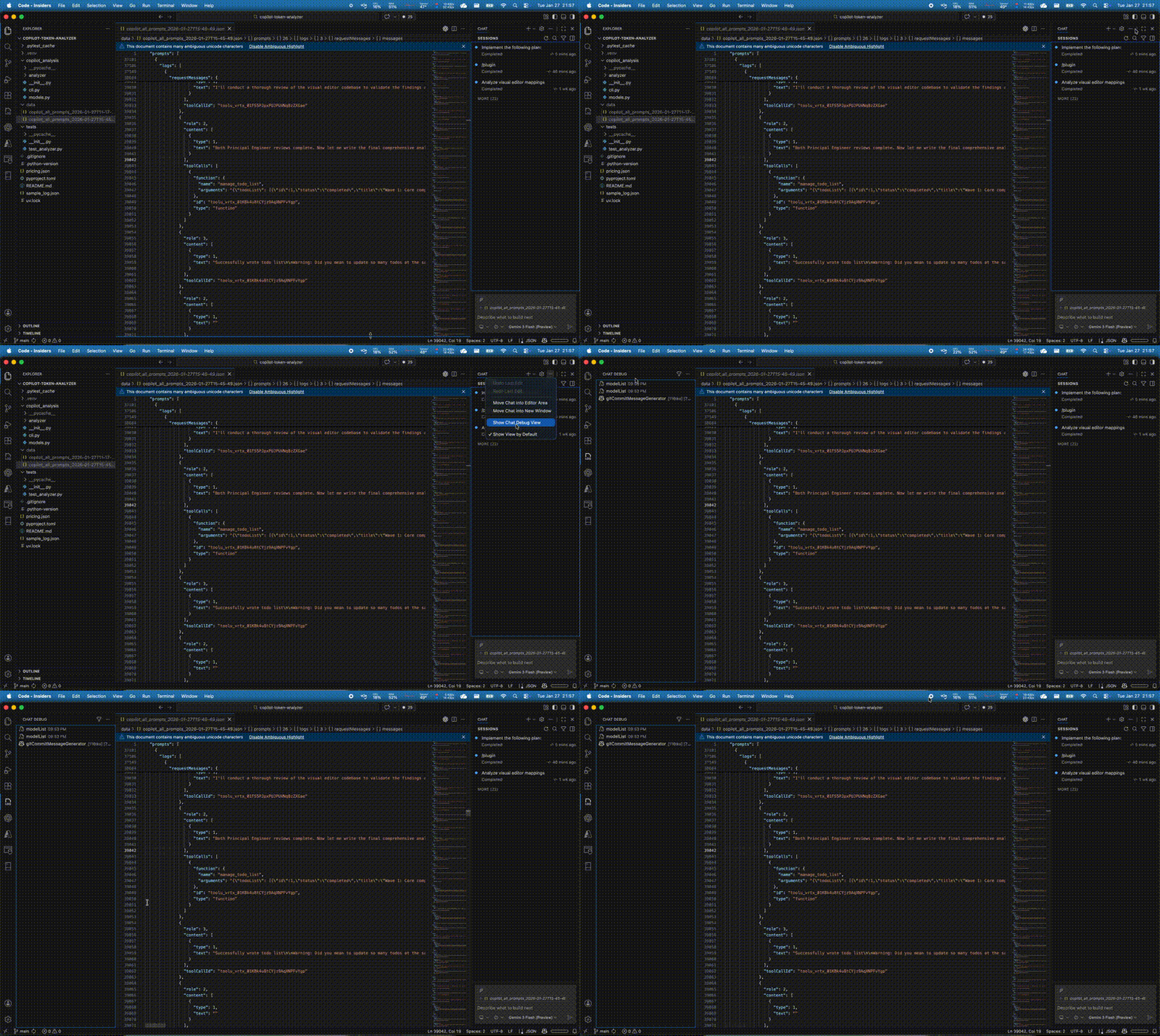
This view logs all requests sent to the GitHub model provider. Even better: you can export the full request history as a JSON file.
By default, it only keeps the last 100 requests, which is not a lot if you’re doing larger agentic runs, but you can increase that limit in the settings:
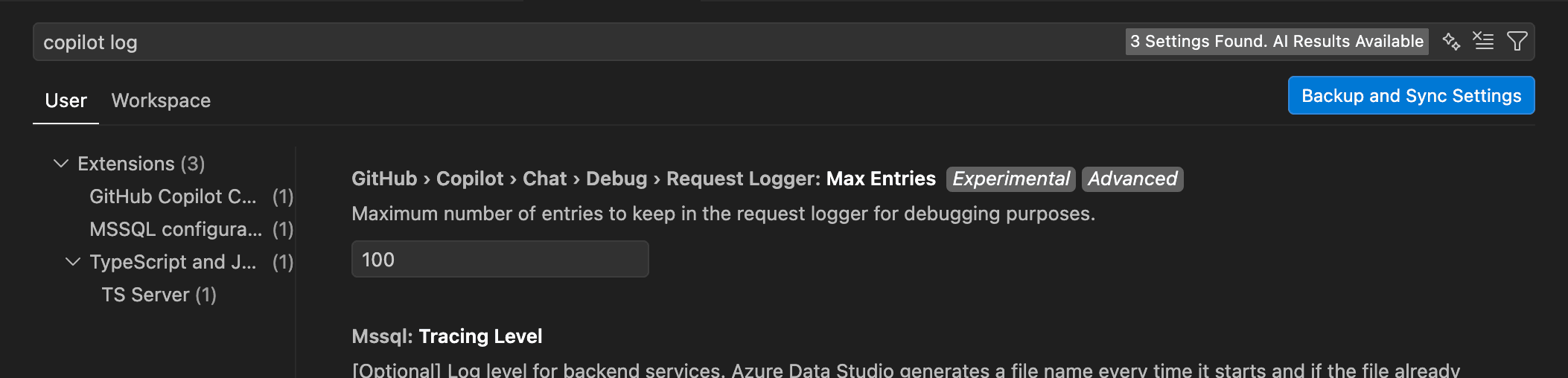
Now things get interesting.
Looking at the economics
The exported JSON log is huge, since it contains all prompts, responses, and metadata exchanged with Copilot. But it also includes token usage per request, which makes it perfect for analysis.
To make sense of this, I wrote a small Python tool that:
- groups requests by logical “prompt session”
- aggregates token usage
- separates input, output, and cached tokens Y
You can find it here: 👉 https://github.com/domdeger/copilot-token-analyzer
For this test, I gave Copilot a moderately complex task:
- analyze parts of my application using subagents
- draft an implementation plan
- extend thumbnail generation to video files
- have the result reviewed by a review subagent
- then implement it
The whole task took about 15 minutes, using Opus 4.5. Here’s the token summary:
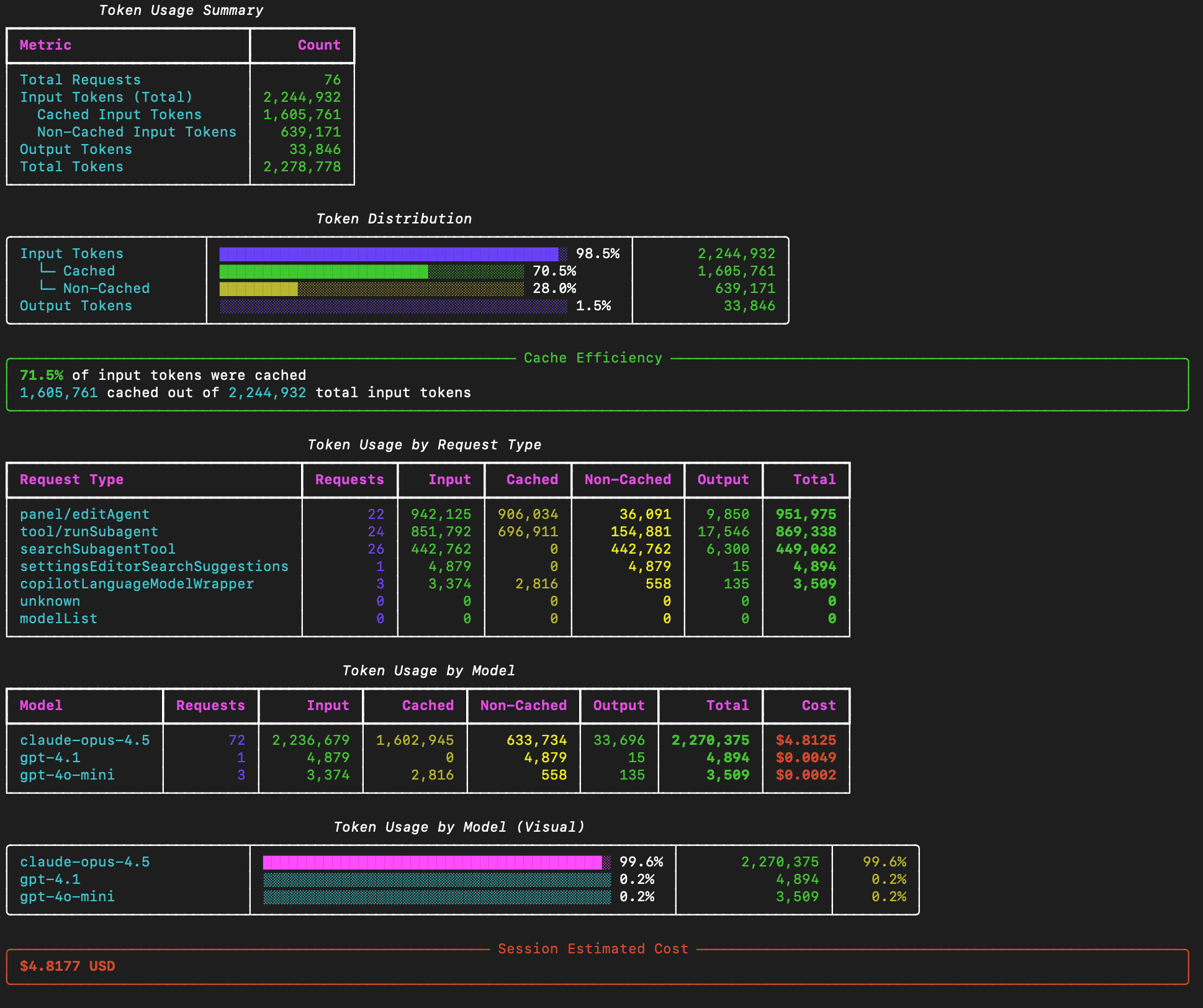
What we see:
- ~650k input tokens
- ~35k output tokens
- a lot of cached tokens
Not great, not terrible. Now the interesting part: cost.
Using the pricing from Microsoft Foundry for Opus 4.5, this entire session comes out to roughly $4.80 worth of tokens. And how much did that actually cost me? 3 Copilot premium requests = $0.12 That’s a pretty good deal.
Conclusion
The request-based billing model is, of course, a mixed calculation. There are plenty of situations where people will use Copilot for small things like adding a unit test, renaming variables, fixing a typo and those barely scratch the surface of what’s possible here. But for longer-running, agentic tasks, the value you can extract is genuinely impressive. Not every problem can be solved by letting an agent run for 15 minutes, but when it can, the efficiency gains are very real. And as a proper Schwabian, I must say: there’s something deeply satisfying about mathematically proving how much money you saved today. 😄